
Authentication
Require people to sign in with your OAuth provider before they use the chat
Auth, in the Chat menu, opens the Authentication page. It turns on OAuth 2.0 sign-in for the chat. By default anyone with the chat's address can use it, and their conversations appear on Threads as Anonymous. With authentication on, the chat sends visitors to your identity provider to sign in first.
This protects who can use the chat. Your MCP server's own authentication is separate; see Authentication in the SDK docs. Only owners and admins can change these settings, and Save changes restarts a deployed chat.
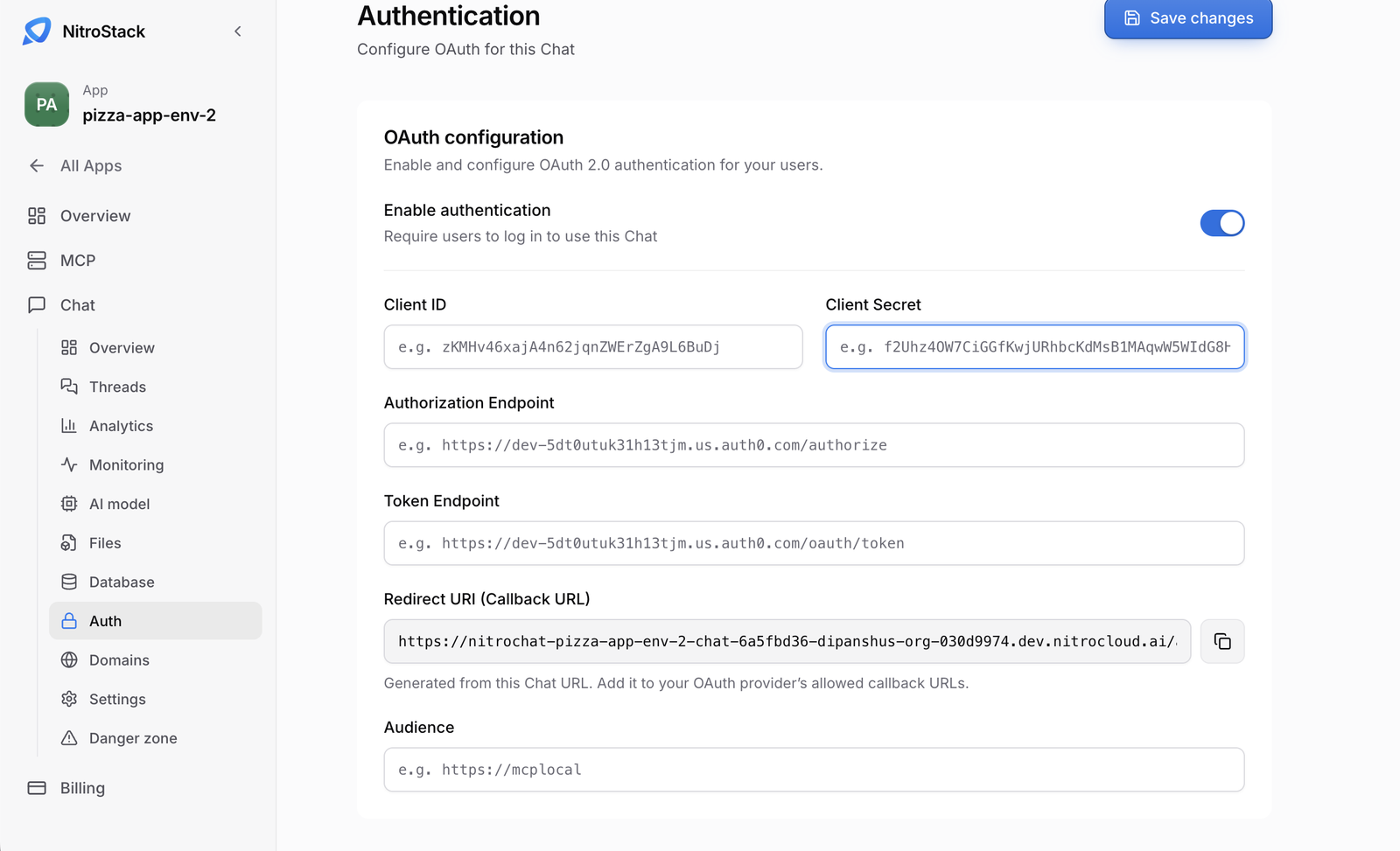
OAuth configuration
Enable authentication is off by default. Off means the chat URL is public. On means the chat requires login, and the fields below appear.
| Field | What to enter | What NitroCloud does with it |
|---|---|---|
| Client ID | The client ID of the OAuth application at your provider. | Sent to the chat as OAUTH_CLIENT_ID. |
| Client Secret | The matching secret. The field is masked. | Stored as a secret and sent as OAUTH_CLIENT_SECRET. It isn't kept in the form: after you leave the page the field is empty, so paste it again if you change it. |
| Authorization Endpoint | The provider's authorize URL. For Auth0 it looks like https://your-tenant.auth0.com/authorize. | Must be a URL. Sent as OAUTH_AUTHORIZATION_ENDPOINT. |
| Token Endpoint | The provider's token URL. For Auth0 it looks like https://your-tenant.auth0.com/oauth/token. | Must be a URL. Sent as OAUTH_TOKEN_ENDPOINT. |
| Redirect URI (Callback URL) | Read-only. You don't type it. | Built from the chat's URL: https://<chat-host>/api/auth/callback. Copy it into your provider. |
| Audience | Optional. The API identifier the provider expects on the token. Auth0 uses its API identifier. Leave it empty if your provider doesn't use an audience. | Sent as OAUTH_AUDIENCE only when it has a value. |
Quick import
Show import appears while authentication is on. Paste .env lines, then click Import configuration. That fills the form; it doesn't save, so click Save changes afterwards.
OAUTH_CLIENT_ID=
OAUTH_CLIENT_SECRET=
OAUTH_AUTHORIZATION_ENDPOINT=
OAUTH_TOKEN_ENDPOINT=
OAUTH_AUDIENCE=
Lines that start with # are ignored, and quoted values are accepted. The same keys without the OAUTH_ prefix also work: CLIENT_ID, CLIENT_SECRET, AUTHORIZATION_ENDPOINT, TOKEN_ENDPOINT and AUDIENCE. REDIRECT_URI and CALLBACK_URL are ignored, because the redirect URI can't be changed by import.
OAuth provider configuration
When authentication is on and the chat has a URL, the page shows an OAuth provider configuration block. Copy every value into your provider (Auth0, Okta, or similar). <chat-host> is the chat's public host.
| Provider setting | Value |
|---|---|
| Allowed callback URLs | https://<chat-host>/api/auth/callback for the chat itself |
| Allowed callback URLs | https://<chat-host>/oauth/callback for an embedded chat |
| Allowed web origins | https://<chat-host> |
| Allowed logout URLs | https://<chat-host>/api/auth/logout |
Register those URLs at the provider, then save in NitroCloud. To check it, open the chat's URL in a private browser window: you should be sent to your provider's sign-in page.
To make the chat public again, turn Enable authentication off and save.