
NitroStack Documentation
NitroStack is an enterprise-grade framework for building MCP (Model Context Protocol) servers with TypeScript. It provides a comprehensive toolkit including decorators, dependency injection, middleware, authentication, and visual widget components.
Package Architecture
NitroStack is organized as a monorepo with multiple packages:
@nitrostack/
├── @nitrostack/core     # Core SDK - Server framework, decorators, DI, transports
├── @nitrostack/cli      # CLI tools - Project creation, dev server, build
└── @nitrostack/widgets  # Widget SDK - React hooks and utilities for widgets
Package Overview
| Package | Description | Install |
|---|---|---|
@nitrostack/core | Core MCP server SDK with decorators, DI, middleware, guards, and transports | npm install @nitrostack/core |
@nitrostack/cli | CLI for project creation, development, and building | npm install -g @nitrostack/cli |
@nitrostack/widgets | Widget development utilities and React hooks | npm install @nitrostack/widgets |
NitroStudio
NitroStudio is a standalone visual testing environment for MCP servers:
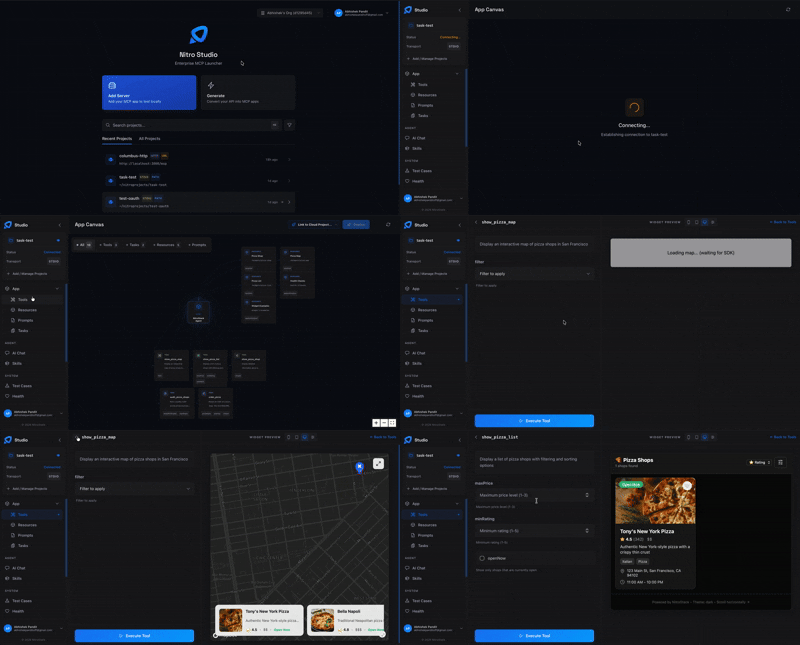
- Desktop application for macOS, Windows, and Linux
- Real-time tool testing and debugging
- AI chat integration
- Widget preview
Documentation Structure
docs/
├── README.md                    # This file
│
├── getting-started/             # Quick start guides
│   ├── 00-introduction.md
│   ├── 01-installation.md
│   └── 02-quick-start.md
│
├── cli/                         # CLI Documentation
│   ├── 01-introduction.md
│   ├── 02-installation.md
│   ├── 03-init-command.md
│   ├── 04-dev-command.md
│   ├── 05-build-command.md
│   ├── 06-configuration.md
│   ├── 07-install-command.md
│   ├── 08-generate-command.md
│   └── 09-upgrade-command.md
│
├── sdk/                         # SDK Documentation
│   └── typescript/
│       ├── 03-server-concepts.md
│       ├── 04-tools-guide.md
│       ├── 05-resources-guide.md
│       ├── 06-prompts-guide.md
│       ├── 07-middleware-guide.md
│       ├── 08-interceptors-guide.md
│       ├── 09-guards-guide.md
│       ├── 09-authentication-overview.md
│       ├── 10-api-key-authentication.md
│       ├── 10-pipes-guide.md
│       ├── 11-oauth-authentication.md
│       ├── 11-validation-guide.md
│       ├── 12-dependency-injection.md
│       ├── 13-error-handling.md
│       ├── 14-testing-guide.md
│       ├── 15-events-guide.md
│       ├── 16-ui-widgets-guide.md
│       ├── 17-best-practices.md
│       ├── 18-widget-sdk-reference.md
│       ├── 19-file-upload-guide.md
│       ├── 20-mcp-tasks-guide.md
│       ├── caching-guide.md
│       ├── rate-limiting-guide.md
│       ├── health-checks-guide.md
│       ├── configuration-guide.md
│       └── performance.md
│
├── studio/                      # NitroStudio Documentation
│   ├── 01-overview.md
│   ├── 02-testing-tools.md
│   ├── 03-chat-interface.md
│   └── 04-standalone-setup.md
│
├── templates/                   # Project Templates
│   ├── 01-starter-template.md
│   ├── 02-oauth-template.md
│   └── 03-pizzaz-template.md
│
├── deployment/                  # Deployment Guides
│   ├── 01-checklist.md
│   ├── 02-docker-guide.md
│   └── 03-cloud-platforms.md
│
├── guides/                      # How-to Guides
│   ├── dual-transport.md
│   ├── verify-transport.md
│   └── widget-sdk-migration.md
│
└── api-reference/               # API Reference
    ├── cli-commands.md
    ├── decorators.md
    ├── execution-context.md
    ├── guards.md
    ├── interceptors.md
    ├── middleware.md
    └── pipes.md
Quick Start
1. Install CLI
Bash
npm install -g @nitrostack/cli
2. Create Project
Bash
nitrostack-cli init my-project
cd my-project
3. Start Development
Bash
npm run dev
4. Open NitroStudio
Download NitroStudio from nitrostack.ai/studio and connect to your project.
Key Features
- Decorator-Based Architecture - Define tools, resources, and prompts with TypeScript decorators
- Multiple Transports - STDIO, HTTP SSE, or dual-mode operation
- UI Widgets - Build React components for tool output visualization
- Authentication - OAuth 2.1, JWT, and API Key authentication built-in
- Dependency Injection - Full IoC container with singleton providers
- Request Pipeline - Guards, middleware, interceptors, pipes, and exception filters
- Event System - Async event emission and handling
- Caching - Response caching with TTL and invalidation
- Rate Limiting - Request throttling per user or globally
- Health Checks - System monitoring and status endpoints
- Hot Reload - Fast development with automatic server restart
Example: Basic Tool
Typescript
import { ToolDecorator as Tool, z, ExecutionContext } from '@nitrostack/core';

export class CalculatorTools {
  @Tool({
    name: 'calculate',
    description: 'Perform arithmetic calculations',
    inputSchema: z.object({
      operation: z.enum(['add', 'subtract', 'multiply', 'divide']).describe('Operation to perform'),
      a: z.number().describe('First operand'),
      b: z.number().describe('Second operand')
    })
  })
  async calculate(input: { operation: 'add' | 'subtract' | 'multiply' | 'divide'; a: number; b: number }, ctx: ExecutionContext) {
    const operations: Record<string, number> = {
      add: input.a + input.b,
      subtract: input.a - input.b,
      multiply: input.a * input.b,
      divide: input.a / input.b
    };
    return { result: operations[input.operation] };
  }
}
Documentation Standards
- Code Examples: All concepts include runnable TypeScript examples
- API Reference: Complete parameter lists, return types, and usage patterns
- Best Practices: Common patterns, anti-patterns, and recommendations
- Cross-References: Related documentation is linked for navigation